 SnapSong
The fastest way to turn a photo of us into a love song is to use an AI love song generator that starts from the picture instead of a text prompt. You choose a photo from a real moment together (the trip, the first date spot, the kitchen on a slow Sunday) and the AI reads what is actually in the frame: the place, the light, the mood, the two of you. Then it writes and sings an original song about that scene.
That grounding in a real photo is what makes the difference. A generic love song could be about anyone. A song born from your picture at the beach at golden hour can mention the sea, the last light, the way that day felt. When the person you love hears details that only the two of you would recognize, the song stops being a gimmick and becomes a keepsake.
It fits the big dates and the small ones: a wedding or dating anniversary, Valentine's Day, the night you propose, or no occasion at all. Sometimes the best custom song for a girlfriend or boyfriend lands on a regular weekday. You do not need to write lyrics, play an instrument or book a studio. You need one good photo and a few minutes.
How to do it with SnapSong
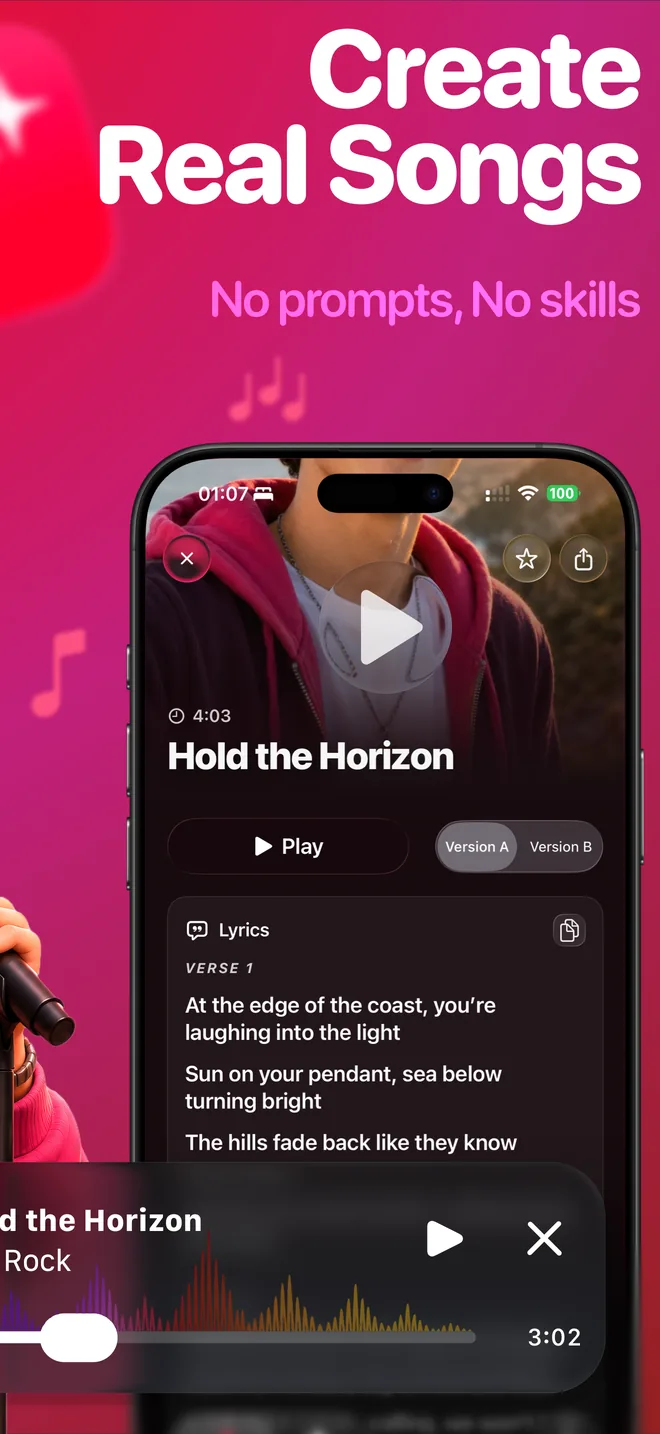
SnapSong is an iPhone app that turns any photo into an original AI song with lyrics, melody and vocals. For a love song, the flow looks like this:
- Pick a photo of the two of you from a real moment. The trip, the restaurant from your first date, the couch where you always end up. SnapSong reads the colors, people, place and mood of the image, so a photo with a story behind it gives the song a story to tell.
- Add keywords with your names and the occasion. Keywords are optional, but this is where a love song gets personal: "Anna and Marco, five years together" or "Julia, Valentine's Day". A short shared memory works too.
- Choose a romantic style. There are more than 50 music styles to pick from. Acoustic and slow pop tend to suit anniversaries; if your relationship sounds more like a rock song, choose rock.
- Generate the song and wait 2 to 5 minutes. You can follow the progress in real time on the Lock Screen and Dynamic Island. The finished song arrives with vocals, melody and the full lyrics, readable inside the app.
- Listen first, then share it privately. Play the whole song and read the lyrics before you send anything. When it feels right, share it directly with your partner through the iOS share sheet: a message just for them, not a post.
Tips for a song that actually lands
Choose a photo where the scene is easy to read. Clear light, a recognizable place, the two of you visible. The AI writes from what it can see, so a sharp golden-hour shot from your trip will inspire more specific lyrics than a dark, cluttered frame.
Use the keywords for the details the photo cannot show: your names, how many years, a phrase only the two of you use. Two or three short keywords guide the AI better than a paragraph.
Match the style to the moment. An anniversary dinner asks for something acoustic and warm; a Valentine's surprise can be brighter. Lyrics come out in English, Portuguese, Spanish, French or German, auto-detected from your device language, so the song arrives in the language you two actually speak.
What to expect, honestly
AI results vary with the photo, and a love song is not the place for a near miss. Always listen to the whole song and read the lyrics before you send it, and expect to generate more than once until the tone feels right.
SnapSong is free to download and try. SnapSong Pro, a subscription, unlocks more song creation, full song playback, downloads, faster generation and two AI versions per photo, which helps when you want options to choose from. Song generation needs an internet connection.
One more thing that matters when the content is this personal: your photos and songs are stored locally on your device, and no account is needed.

 AI Music Maker: SnapSong, free on the App Store